If you'd like to delete your Subpilot account, please follow the steps below.
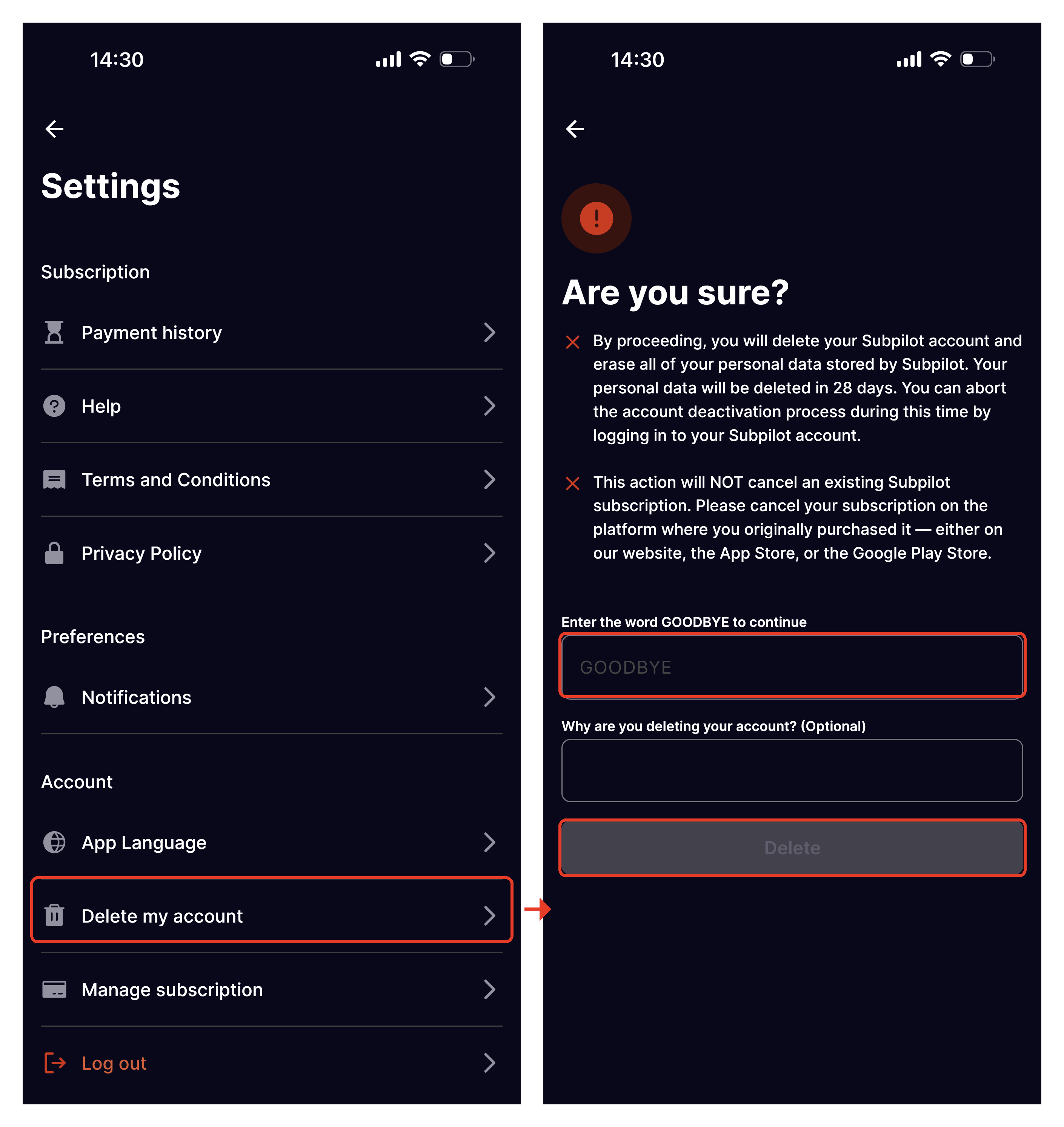
Step 1 — Settings → Account settings → Delete my account
- Open the Subpilot app and go to Settings.
- Scroll down to the Account section and tap Delete my account.
- On the confirmation screen, type the word GOODBYE in the field provided — this unlocks the Delete button.
- Optionally, tell us why you're deleting your account.
- Tap Delete.
On the confirmation screen you'll see:
- Your account and all personal data stored by Subpilot will be permanently deleted in 28 days.
- You can cancel the deletion any time before then simply by logging back into your Subpilot account.
- An optional field lets you share why you're deleting your account.
Step 2 — Check your email
After tapping Delete account, you'll land on a Check your email screen and tap Done.
- You will get a confirmation email to finalize the request.
- If it doesn't arrive within an hour, contact support at privacy@subpilot.tech.
- Tapping Done does not log you out — you're returned to your homepage, and your account stays fully active until the deletion is confirmed.
Important to know
- The deletion only happens if the user clicks the link inside the email ("start the deletion link"). If the email is ignored and the link isn't clicked, the deletion request is never initiated and the account remains active as normal.
- One request per 30 days. A new deletion request can only be submitted once every 30 days. If you try again sooner, you'll see a popup explaining this.
- 28‑day grace period. Once the deletion is confirmed via email, the account and all personal data are permanently deleted after 28 days. Logging back in at any point during that window cancels the deletion.
Was this article helpful?
That’s Great!
Thank you for your feedback
Sorry! We couldn't be helpful
Thank you for your feedback
Feedback sent
We appreciate your effort and will try to fix the article